Grid
Grid is derived from Control class.
[lide.widgets] ^1.1lide.widgets.controls.grid 1.0
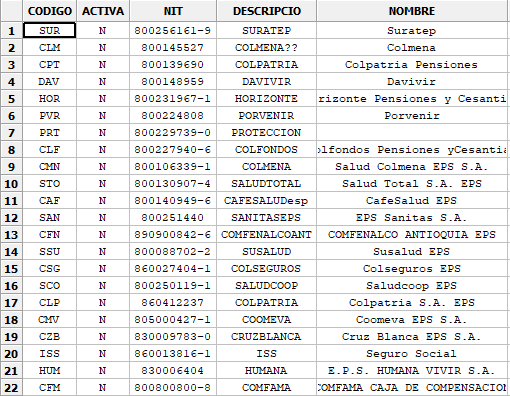
The Grid control is used for displaying and editing tabular data. They provide a rich set of features for display, editing, and interacting with a variety of data sources.
The general look of a control at runtime is demonstrated in the following picture:
Constructor
Control class has a single constructor:
Grid:new {
   object Parent, string Name,
   number PosX, number PosY,
   number SelectMode = Grid.GRID_SELMODE_ROWS,
}
Arguments
These arguments are received by class constructor.
| Argument | Description |
|---|---|
| Name | The control name |
| Parent | The control parent |
| PosX | Position related to X |
| PosY | Position related to Y |
| SelectMode | Grid.GRID_SELMODE_ROWS Grid.GRID_SELMODE_CELLS Grid.GRID_SELMODE_COLUMNS |
Events
The following events are emitted by this class:
| Event name | Description |
|---|---|
| Grid.onSelectCell | When the selected date was changed. |
Inherited Methods
These methods are inherited from its super classes:
| Class Method | Description |
|---|---|
| Object:getName | Returns control’s name. |
| Object:setName | Sets the control name. |
| Widget:getParent | Returns control’s parent. |
| Widget:setParent | Sets the control parent. |
| Widget:getPosX | Returns control’s position related to X. |
| Widget:setPosX | Sets the control position related to X. |
| Widget:getPosY | Returns control’s position related to Y. |
| Widget:setPosY | Sets the control position related to Y. |
| Widget:getEnabled | Returns true if is enabled. |
| Widget:setEnabled | Set control enabled or disabled. |
| Widget:getVisible | Returns the control visibility. |
| Widget:setVisible | Returns the control visibility. |
| Widget:getBind | Returns a reference to the C++ control. |
Class Methods
These methods are defined by this class.
Grid:getTable
Returns a base pointer to the current table object.
| nil | Grid:enableYearChange( bool Enable = true ) |
Grid:setTable
Passes a pointer to a custom grid table to be used by the grid. This should be called after the grid constructor and before using the grid object. If takeOwnership is set to true then the table will be deleted by the wxGrid destructor.
| bool | Grid:setTable( table grid_table, bool auto_size, bool takeOwnership, number selmode = Grid.GRID_SELMODE_CELLS ) |
Grid:setDefaultCellFont
Sets the default font to be used for grid cell text.
| nil | Grid:setDefaultCellFont( string sFontFamily, number nFontSize, string sFontFlags ) |
Grid:setCellFont
Sets the font for text in the grid cell at the specified location.
| nil | Grid:setCellFont( number nRow, number nCol, string sFontFamily, number nFontSize, string sFontFlags ) |
Grid:setDefaultCellAlignment
Sets the default horizontal and vertical alignment for grid cell text.
Horizontal alignment should be one of
Grid.ALIGN_LEFT,Grid.ALIGN_CENTREorGrid.ALIGN_RIGHT. Vertical alignment should be one ofGrid.ALIGN_TOP,Grid.ALIGN_CENTREorGrid.ALIGN_BOTTOM.
| nil | Grid:setDefaultCellAlignment( number nHoriz, number nVert ) |
Grid:setCellAlignment
Sets the horizontal and vertical alignment for grid cell text at the specified location.
Horizontal alignment should be one of
Grid.ALIGN_LEFT,Grid.ALIGN_CENTREorGrid.ALIGN_RIGHT. Vertical alignment should be one ofGrid.ALIGN_TOP,Grid.ALIGN_CENTREorGrid.ALIGN_BOTTOM.
| nil | Grid:setCellAlignment( number nRow, number nCol, number nHoriz, number nVert ) |
Grid:setRowLabelSize
Sets the width of the row labels.
If width equals
Grid.GRID_AUTOSIZEthen width is calculated automatically so that no label is truncated. Note that this could be slow for a large table. This flag is new since wxWidgets version 2.8.8.
| nil | Grid:setRowLabelSize( number nWidth ) |
Grid:setColLabelSize
Sets the height of the column labels.
If width equals
Grid.GRID_AUTOSIZEthen width is calculated automatically so that no label is truncated. Note that this could be slow for a large table. This flag is new since wxWidgets version 2.8.8.
| nil | Grid:setColLabelSize( number nHeight ) |
Grid:getRowLabel
Returns the specified row label. The default grid table class provides numeric row labels. If you are using a custom grid table you can override GridTable:getRowLabelValue to provide your own labels.
| string | Grid:getRowLabel( number nRow ) |
Grid:getColLabel
Returns the specified column label. The default grid table class provides column labels of the form A,B…Z,AA,AB…ZZ,AAA… If you are using a custom grid table you can override GridTable:GetColLabelValue to provide your own labels.
| string | Grid:getRowLabel( number nRow ) |
Grid:setRowLabel
Set the value for the given row label. If you are using a derived grid table you must override GridTable:setRowLabel for this to have any effect.
| nil | Grid:setRowLabel( number nRow, string sText ) |
Grid:setColLabel
Set the value for the given column label. If you are using a derived grid table you must override GridTable:setColLabelValue for this to have any effect.
| nil | Grid:setColLabel( number nCol, string sText ) |
Grid:autoSize
Automatically sets the height and width of all rows and columns to fit their contents.
Note
Grid sets up arrays to store individual row and column sizes when non-default sizes are used. The memory requirements for this could become prohibitive if your grid is very large.
| nil | Grid:autoSize() |
Grid:autoSizeColumn
Automatically sizes the column to fit its contents. If setAsMin is true the calculated width will also be set as the minimal width for the column.
Note
Grid sets up arrays to store individual row and column sizes when non-default sizes are used. The memory requirements for this could become prohibitive if your grid is very large.
| nil | Grid:autoSizeColumn( number nCol, bool SetAsMin = true ) |
Grid:autoSizeColumns
Automatically sizes all columns to fit their contents. IfsetAsMinistruethe calculated widths will also be set as the minimal widths for the columns.
Note
Grid sets up arrays to store individual row and column sizes when non-default sizes are used. The memory requirements for this could become prohibitive if your grid is very large.
| nil | Grid:autoSizeColumns( bool setAsMin = true ) |
Grid:autoSizeRow
Automatically sizes the row to fit its contents. IfsetAsMinistruethe calculated height will also be set as the minimal height for the row.
Note
Grid sets up arrays to store individual row and column sizes when non-default sizes are used. The memory requirements for this could become prohibitive if your grid is very large.
| nil | Grid:autoSizeRow( number nRow, bool SetAsMin = true ) |
Grid:autoSizeRows
Automatically sizes all rows to fit their contents. IfsetAsMinistruethe calculated height will also be set as the minimal heights for the rows.
Note
Grid sets up arrays to store individual row and column sizes when non-default sizes are used. The memory requirements for this could become prohibitive if your grid is very large.
| nil | Grid:autoSizeRow( bool setAsMin = true ) |
Grid:autoSizeColLabelSize
Automatically adjusts width of the column to fit its label.
| nil | Grid:autoSizeColLabelSize( number nCol ) |
Grid:autoSizeRowLabelSize
Automatically adjusts height of the row to fit its label.
| nil | Grid:autoSizeRowLabelSize( number nRow ) |
Grid:setRowSize
Sets the height of the specified row.
Note
See setColSize() for more information.
| nil | Grid:setRowSize( number nRow, number nHeight ) |
Grid:setColSize
Sets the width of the specified column.
This function does not refresh the grid. If you are calling it outside of a BeginBatch / EndBatch block you can use Grid:forceRefresh to see the changes.
Automatically sizes the column to fit its contents. If setAsMin is true the calculated width will also be set as the minimal width for the column.
Note
Grid sets up arrays to store individual row and column sizes when non-default sizes are used. The memory requirements for this could become prohibitive if your grid is very large.
| nil | Grid:setColSize( number nCol, number nWidth ) |
Grid:getCellSize
Get the size of the cell in number of cells covered by it.
For normal cells, the function fills both num_rows and num_cols with 1 and returns CellSpan_None. For cells which span multiple cells, i.e. for which SetCellSize() had been called, the returned values are the same ones as were passed to SetCellSize() call and the function return value is CellSpan_Main.
More unexpectedly, perhaps, the returned values may be negative for the cells which are inside a span covered by a cell occupying multiple rows or columns. They correspond to the offset of the main cell of the span from the cell passed to this functions and the function returns CellSpan_Inside value to indicate this.
As an example, consider a 3*3 grid with the cell (1, 1) (the one in the middle) having a span of 2 rows and 2 columns, i.e. the grid looks like
Then the function returns 2 and 2 in num_rows and num_cols for the cell (1, 1) itself and -1 and -1 for the cell (2, 2) as well as -1 and 0 for the cell (2, 1).
Parameters
row The row of the cell.col The column of the cell.num_rows Pointer to variable receiving the number of rows, must not be NULL.num_cols Pointer to variable receiving the number of columns, must not be NULL.
| nil | Grid:getCellSize( number nRow, number nCol ) |
Grid:setCellSize
Set the size of the cell.
Specifying a value of more than 1 in num_rows or num_cols will make the cell at (row, col) span the block of the specified size, covering the other cells which would be normally shown in it. Passing 1 for both arguments resets the cell to normal appearance.
See also: Grid:getCellSize()
Parameters
row The row of the cell.col The column of the cell.num_rows Number of rows to be occupied by this cell, must be >= 1.num_cols Number of columns to be occupied by this cell, must be >= 1.
| nil | Grid:setCellSize( number row, number col, number num_rows, number num_cols ) |